
You can extend eClinicalWorks with a Chrome extension that works inside the eCW web screens your team already uses. It knows which appointment is on screen, pulls the matching data from your RCM tools, and saves it into eCW, with no copy-paste. For billers and RCM companies, that closes the gap eCW's API leaves open: you can read almost anything from eCW, but you can write very little back.
If your team still copies eligibility results from one system and pastes them into eCW appointment by appointment, this guide is for you.
Why eClinicalWorks Is Hard to Integrate With for Billing Teams
eClinicalWorks is one of the most widely used EHRs in independent practices. It also has one of the most frustrating integration stories for anyone working on the revenue cycle.
eCW's API is mostly read-only
eCW's certified FHIR R4 API is good for reading data: patients, encounters, appointments, coverage. It doesn't let third parties write the things billers care about. You can't add an appointment note, update a visit status or set a copay through it.
The alternatives each have a cost:
- eCW's partner program: broader access, but a long, paid approval process with limited write scope.
- HL7 interfaces: reliable for bulk data, but each clinic has to request and pay for them, and setup takes weeks.
- Manual work: what most teams end up doing.
The hidden cost of copy and paste

Your RCM platform knows the patient's coverage ended last month. Your eligibility tool knows the copay is $30. But that information only helps if the front desk sees it in eCW before the patient walks in.
So billers copy results into General Notes. Front-desk staff re-key copays. Someone checks a spreadsheet to see which appointments were already verified. Every step is a chance for a typo, a missed patient or a denial weeks later.
The CAQH Index tracks this every year: manual eligibility and benefit checks cost providers far more in staff time than fully electronic ones. The data exists. It just never makes it into the EHR.
Why This Hits Billing Companies Hardest
A single practice feels this pain once. A billing company feels it for every client.
- It doesn't scale with headcount. Every new client practice adds hours of copy-paste to the same team. Growth means hiring people to move data between screens.
- Every practice is set up a little differently. Different providers, facilities and visit types mean your team has to remember where things go in each client's eCW.
- Errors land on your scorecard. When a lapsed plan slips through and the claim is denied, the client sees a billing problem, even if the root cause was a note nobody had time to paste.
- You can't prove the work was done. "We verified everyone" is hard to show when the evidence lives in a spreadsheet instead of the patient's appointment.
The front end of the revenue cycle is where most avoidable denials start. If eligibility results don't reach eCW reliably, the back office ends up cleaning up the mess weeks later.
What a Chrome Extension Can Do Inside eClinicalWorks
eCW's web version runs in the browser. A Chrome extension can run alongside it, inside the same screens, using the same session your staff is already logged into. No extra passwords are needed for eCW, and nothing gets installed on the clinic's servers.
Think of it as adding new buttons and panels to eCW that connect it to the rest of your RCM stack.
It knows what's on screen
When a user opens an appointment or views the day's schedule, the extension knows which patient and visit they're looking at, and fetches the right result from your RCM platform.
Changes are saved through eClinicalWorks itself
Nothing is written behind eCW's back. Changes are saved through eClinicalWorks, so its validations, audit log and connected interfaces keep working exactly as they do today. Your compliance team sees the same trail they always have.
It works on one appointment or the whole schedule
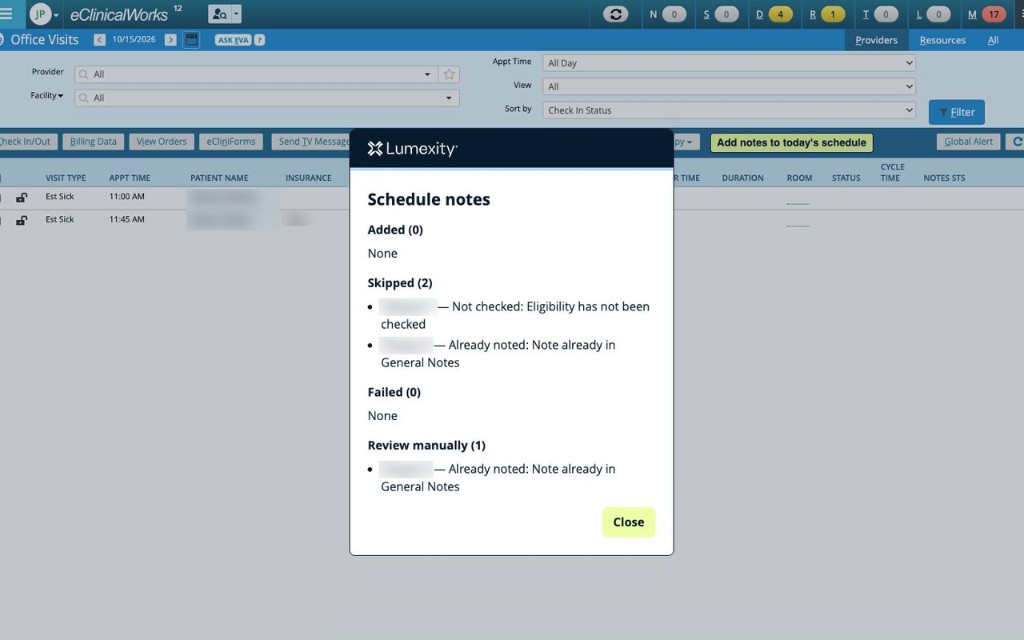
Staff can add a result to a single appointment with one click, or process the entire day's schedule in one run, with a summary of what was added, what was skipped and what needs a human.
What You Can Do With Lumexity for eCW Today

Lumexity verifies eligibility automatically ahead of each visit. The Lumexity for eCW extension brings those results straight into eClinicalWorks:
- One-click eligibility notes. A Lumexity button in the appointment window adds a standardized eligibility note to General Notes: coverage status, plan, copay, deductible remaining and PCP on file.
- Notes for the whole schedule. Batch mode adds notes to every appointment on the day's schedule and shows a summary when it's done, including which patients need manual review.
- No overwrites, no duplicates. Existing notes are kept, Lumexity notes are clearly labeled, and appointments that already have a note are skipped.
- Your team stays in control. Users see what's happening, can stop a batch at any time, and get a clear list of anything that couldn't be completed.
The result: the front desk sees verified coverage and the right copay inside eCW, and your billers stop moving data between screens.
Extension vs. API vs. HL7: Which Should You Use?
Each option has a place. Here's how they compare for typical RCM work in eCW:
| Capability | Chrome extension | eCW FHIR API | HL7 interface |
|---|---|---|---|
| Write notes and visit fields | Yes, through eCW's UI | No (read-only) | Limited (documents) |
| Setup time | Same day | Days to weeks | Weeks to months |
| Cost to the clinic | No eCW interface fees | Partner program | Per-interface fees |
| eCW audit log | Kept, through normal save | N/A | Depends on interface |
| Best for | Front-desk and biller workflows | Reading data at scale | High-volume data feeds |
In practice, the strongest setup combines them. Use the API to read eCW data at scale, and the extension to write results back where your team works.
What an Extension Can't Do (Yet)
Being clear about limits saves everyone time:
- It needs the web version of eCW in Google Chrome. It doesn't work with the eCW desktop application.
- It runs while a user is logged in. The extension works in the browser session of someone who has eCW open, not as an unattended overnight job.
- It isn't a replacement for clinical documentation tools. It's built for front-desk and billing workflows, not progress notes or orders.
What to Look for in an eClinicalWorks Extension
Not every extension is built for healthcare. Before you install one in a client practice, ask these questions:
- Does it save through eCW, or around it? Shortcuts that bypass eCW can skip validations and audit logs.
- Does it handle PHI responsibly? Patient data shouldn't be stored in the browser, and every connection should be encrypted. Ask whether the vendor signs a Business Associate Agreement.
- Does it ask for minimal permissions? It should only run on eCW and its own service, nothing else.
- Does a human stay in control? Look for confirmations, clear summaries and an easy way to stop a batch.
- Is it distributed through the Chrome Web Store? That allows managed installs by clinic IT and automatic updates.
Get Eligibility Results Into eClinicalWorks
If your team verifies eligibility for practices on eClinicalWorks, the last mile shouldn't be copy and paste.
See how Lumexity works with eClinicalWorks or read more about automated eligibility verification.
Frequently Asked Questions
Can you write data back to eClinicalWorks through its API?
Very little. eCW's FHIR API is mainly read-only for third parties. Writing notes, visit statuses or copays usually requires eCW's partner program, an HL7 interface or a browser-based integration that works through eCW's own screens.
Is a Chrome extension safe to use with eClinicalWorks?
It can be, if it's built for healthcare. A safe extension only runs on eCW and its vendor's service, keeps patient data out of the browser, uses encrypted connections and saves changes through eCW so audit logs stay intact. Ask the vendor about a BAA before installing.
Does an eClinicalWorks extension work with the desktop app?
No. Chrome extensions work with the web version of eClinicalWorks in Google Chrome. Most practices on eCW cloud already use the web version.
Do clinics need to pay eClinicalWorks for an interface to use an extension?
No. The extension works inside the eCW web application that staff already log into, so no separate eCW interface is needed. Clinics should still review their own internal IT and compliance policies before installing any browser extension.
Can billing companies use an extension across multiple client practices?
Yes. Because it runs in the user's browser, a billing company can use the same extension with each client practice's eCW, as long as their team has access to that practice's eCW account.
eClinicalWorks is a trademark of its respective owner. Lumexity is an independent product and is not affiliated with, endorsed by, or sponsored by eClinicalWorks, LLC.